
Webflow updates its pricing + a library of 100 buttons
Digidop's newsletter from May 16, 2026.
Welcome to the Digidop newsletter. Once again this week, we're bringing you the best news from the world of the web — and the Webflow ecosystem.
On the program:
Webflow updates its pricing
Latest Webflow updates
A library of 100 buttons
Webflow updates its pricing
On May 13th, Webflow announced a structural update to its pricing. Not a simple price adjustment, a deliberate repositioning.

In short, the former CMS and Business plans are merging into a single Premium plan at $25/month. The Basic plan goes from $14 to $15/month. And most notably, Webflow introduces a new Team plan at $2,500/month, a middle layer between self-serve and Enterprise, designed for teams that have outgrown standard plans without yet needing a full Enterprise setup.
AI is also entering the equation with a credit-based system, some features remaining included in subscriptions, others moving to usage-based consumption.
Our take: it’s a coherent bet. While AI builders will likely absorb the market for small sites and simple landing pages, Webflow keeps pushing toward more complex needs: collaboration, governance, scale, multi-team management. The pricing was simply too low relative to the platform’s actual value. This repositioning sends a clear signal: Webflow now compares itself to major players like HubSpot or Semrush, not to low-cost page builders.
We published a full article on the topic this week. It breaks down the changes plan by plan, the concrete impact on existing subscriptions, and our take on the strategy behind it all.
New Webflow features
Updated pricing and simplified plans — new Premium plan, Team plan, AI credits included in every Workspace.
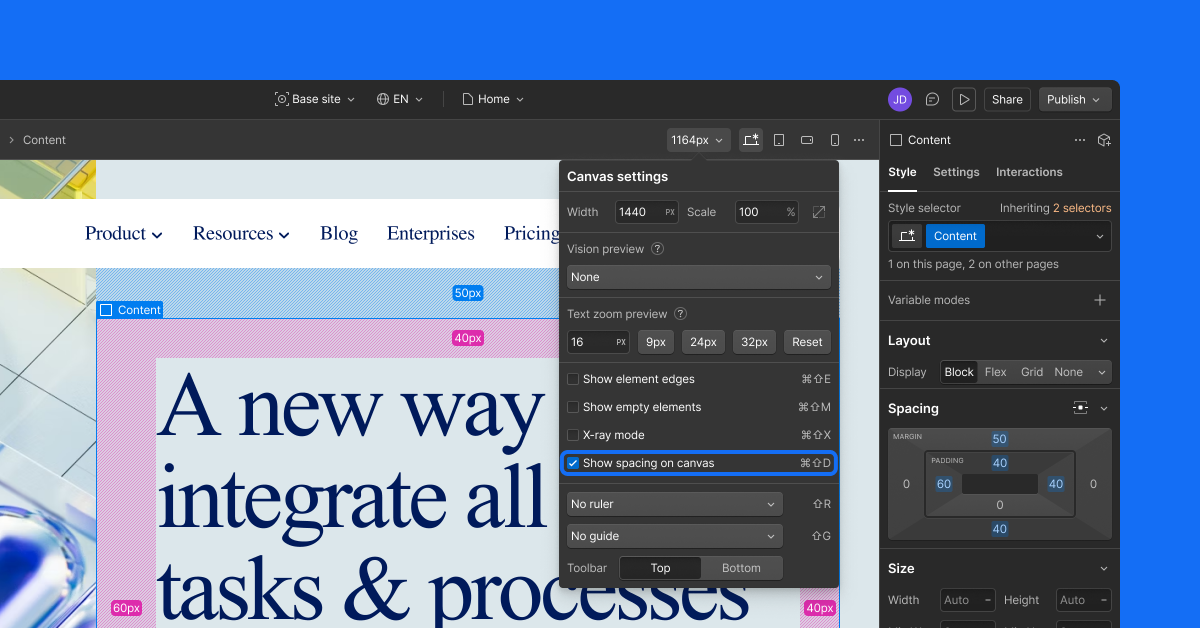
See spacing values on the canvas — margin and padding values can now be displayed directly on the canvas for faster spacing inspection.
Set a default preview role for each site — you can now save a default preview role per site (Marketer or Content editor) so the canvas opens in that role automatically on every visit.
Single-Page Publishing & page-specific access now controls who can publish — Admins can now restrict full-site publishing for users with page-specific access.
Quick snaps
And last but not least, here's some of the content we've picked up this week:
This project changed how I think about web design — Timothy Ricks looks back on a recent project and shows how Claude can help prototype advanced features very quickly.
If you’re creative and technical, now is the time — Flux Academy on how AI removes time barriers for building highly technical and creative things.
We spent 6 months making 100 buttons — Ilja Van Eck from Osmo presents their new library of 100 creative buttons — a good way to stand out through creative touches.
Animate anything with Webflow Interactions — Timothy Ricks shares tips on animating CSS variables directly from Webflow’s native interactions panel.
That's all for this week.
As always, we welcome your feedback. Reply to this e-mail to give us your opinion, tell us what you'd like to see in this newsletter or ask us any questions you may have.
Talk next week,
Lucas from Digidop